How do I play Words Search Classic Edition?
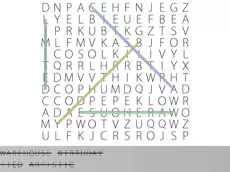
Look for the words listed on the side of the grid. Click and drag your mouse over the letters in the grid to highlight the word once you find it.

Launch instantly in your browser and start playing in seconds.

Loading... Please, wait
 = select letters
Sneaky words think they can hide among the letters, but your eagle eyes will track them down! In Words Search Classic Edition, your goal is to find all the words listed on the side of the board. These words can be placed horizontally, vertically, or even diagonally. As you progress through the levels, the grids get larger and the word lists become more challenging.
Speed is essential because time is your primary opponent. You must complete the list within the set time limit to advance; otherwise, it is game over and you will have to start your streak from the beginning. How many levels can you clear before the timer hits zero? Accept the challenge and prove your vocabulary skills.
This classic word puzzle game is perfect for improving vocabulary and pattern recognition. With its clean interface and challenging time-based gameplay, it provides a brain-teasing experience for players of all ages. To master the game, focus on the first letter of each target word and quickly scan the surrounding grid to find the match.
Look for the words listed on the side of the grid. Click and drag your mouse over the letters in the grid to highlight the word once you find it.
Words can be hidden horizontally, vertically, or diagonally in any direction.
If you fail to find all the words before the time limit expires, the game ends and you must restart from the first level.
Yes, the game is designed to work in modern web browsers on both desktop and mobile devices.
The game is playable directly in your browser, which typically allows access on most networks where browser gaming is permitted.