Can I play Garage Parking for free?
Yes, Garage Parking is completely free to play in your web browser on PacoGames.

Launch instantly in your browser and start playing in seconds.

Loading... Please, wait
 = ride
C = camera
P = pause
R = reset car
SPACE = handbrake
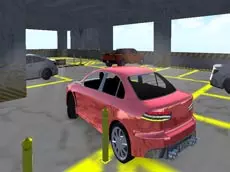
You went to the city for shopping in your new car, but you cannot find a single place where you could park your supermodern vehicle. Perhaps it would be a good idea to go to the covered garages right in the city center. You might be lucky, and some place will be there. This garage parking game requires absolute precision; one place has just become available, but you must take great care so you do not scratch the paint on your new car. The slightest mistake could cause a lot of nerves and worries with subsequent paint jobs. It is time to prove your skills in one of the most realistic parking garage games online. Can you park like a pro and avoid crashing into anything on the way?
As you progress, the levels become increasingly difficult, requiring tighter turns and better spatial awareness. Whether you are a casual player or a fan of hardcore driving simulators, Garage Parking offers a rewarding experience for anyone looking to master the art of the perfect park.
Yes, Garage Parking is completely free to play in your web browser on PacoGames.
Garage Parking is primarily designed for desktop browsers using keyboard controls for the best driving experience.
The game features multiple challenging levels set within a multi-story parking garage in the city center.
Yes, you can switch your perspective by pressing the 'C' key to help navigate tight corners.
If you crash or scratch your car, you may need to restart the level or use the 'R' key to reset your position.