Is Cannoneer free to play?
Yes, you can play Cannoneer for free directly in your web browser on PacoGames.

Launch instantly in your browser and start playing in seconds.

Loading... Please, wait
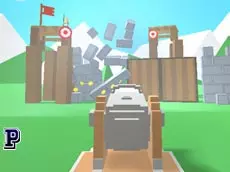
Cannoneer is a physics-based destruction game that puts you in control of a massive siege weapon to level enemy fortresses and complete challenging objectives.
SPACE = Start game
 = Shootright, Change ammo
R = Restart
A rare opportunity has arrived! Take control of the most powerful and destructive cannon ever built. This weapon is unlike anything seen before, and you hold its devastating power in your hands. Your mission is to destroy enemy fortresses using various types of specialized bombs to level them to the ground.
A true cannoneer must be precise. Every fortress features three main objectives: eliminating guards, hitting specific targets, and discovering hidden treasure chests. Successfully completing all goals will grant you access to bonus levels, which serve as a serious test of your aiming skills and strategic planning. Have fun and start the siege!
Yes, you can play Cannoneer for free directly in your web browser on PacoGames.
To unlock bonus levels, you must complete all three primary objectives in a stage: eliminating guards, hitting targets, and finding the treasure chest.
Cannoneer is primarily designed for desktop browsers as it requires mouse controls for aiming and shooting.
You can change your ammo type by using the right mouse button to cycle through the available bombs.
If you need to start over or find yourself in a difficult position, press the R key on your keyboard to restart the current level.