Can I play Word Search Classic for free?
Yes, Word Search Classic is completely free to play in your web browser on PacoGames.

Launch instantly in your browser and start playing in seconds.

Loading... Please, wait
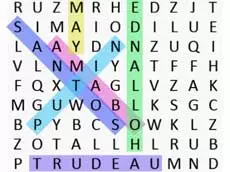
Word Search Classic is a polished puzzle experience where you scan grids for hidden terms. This classic word search game features multiple categories and a global leaderboard to test your skills.
 = Interaction
Word Search Classic brings the traditional pen-and-paper experience to your browser. Your goal is to find all the words listed on the side and highlight them within the letter grid. Words can be hidden vertically, horizontally, diagonally, and even backwards. Whether you are a fan of the classic edition or new to the genre, this game offers endless brain-teasing fun.
Choose from 10 diverse categories to customize your experience. If you find yourself stuck on a particularly tricky grid, you can use the hint feature to reveal a word's location. The game also features a high-score system, allowing you to track your progress and compete against other players globally. It's the perfect classic word search game for quick breaks or long sessions.
Yes, Word Search Classic is completely free to play in your web browser on PacoGames.
The game is a standard web-based puzzle; availability depends on your local network settings for gaming sites.
There are 10 different categories to choose from, covering various topics to keep the gameplay fresh.
Words can be placed horizontally, vertically, or diagonally. Once you spot one, use your mouse to highlight the letters from start to finish.
You can use the hint button, which will automatically mark one of the remaining words in the grid for you.